> For the complete documentation index, see [llms.txt](https://disabled.vehiclesplugin.com/llms.txt). Markdown versions of documentation pages are available by appending `.md` to page URLs; this page is available as [Markdown](https://disabled.vehiclesplugin.com/master.md).
# Vehicles | Disabled
{% hint style="danger" %}
Please read the entire page!\
\
That means: Read every point one after the other! Do not skip parts!
{% endhint %}
***
## What is the issue?
It seems like your server has been infected with malware. How do we know?
Vehicles disables itself, as soon as another plugin tries to copy a folder into our `Vehicles.jar` file.
***
## Folder? What folder?
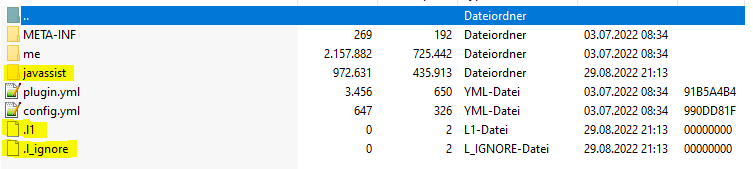
These folders are called `javassist`, `directleaks`, or a random bunch of letters/numbers. The name `javassist` is the most common one.
These folders contain code, which opens a connection to a webserver and shares all kinds of data and IPs from your server.
***
## How do I check for the malware?
There are multiple tools for this - Here are the top 3 we use / suggest:
* Online Jar Checkers (Easiest & Fastest) ([go to page](https://scan.rikonardo.com/))
* Use tools like the one linked above, to check your jar files. This specific site even gives you insight in the malicious code, and is easiest way to scan your plugins.
* AntiMalware Tool ([go to page](https://www.spigotmc.org/resources/spigot-anti-malware.64982/))
* Follow the instructions on the page to check for infected jar files\
\
*Please note that this is not a plugin and not from us!*
* WinRar / 7Zip
* Use WinRar or 7Zip to open the jar files and look manually for the folders mentioned above.\
\
*Please not that WinRar or 7Zip are neither from us, nor are we affiliated with them. This is merely a suggestion!*
These are the files which get copied into every single plugin. This is what you see when using WinRar.
***
## Where does that folder come from?
The folder gets copied from one plugin into every other plugin on your server.
But whats their source? What plugin copies them?
* Cracked Plugins,
* Small, unknown plugins,
* A plugin which has bad intentions
Please keep in mind that these plugins can also come from SpigotMc, Polymart, McMarket, or other sites. We highly recommend sticking to plugins of higher quality, and plugins with high download counts.
***
## How do I get rid of the infected plugins / malware?
There's only one option: Remove every `.jar` file from your server (even your `server.jar`) and download everything again. Please note that you only need to remove the `.jar` files - you can keep the config folders!\
\
Make sure to not upload them one by one, as they will simply get infected again and need to start over!
1. Stop the server
2. Remove ALL `.jar` files
3. Upload the fresh files
4. Only then start the server.
We highly recommend you run your new jar files through a tool we mentioned above, before you add them back.